Choosing Deployment Approach (Helm or GitOps)
Introduction
When creating a deployment pipeline in Devtron, you can choose how your application gets deployed to a Kubernetes cluster. Devtron supports three deployment approaches:
- Helm — Deploys directly to the cluster using Helm, without any Git-based state tracking.
- GitOps (Via Argo CD) — Uses Argo CD to sync your deployment state from a Git repository to the cluster.
- GitOps (Via Flux CD) — Uses Flux CD to sync your deployment state from a Git repository to the cluster.
By default, this choice is presented as a set of radio buttons in the Create Deployment Pipeline dialog. However, this UI can be shown or hidden using feature flags — giving platform admins control over which deployment approach is available to users.
Prerequisites
Users need to have Super-Admin permission to modify feature flags in ConfigMaps.
Before the GitOps deployment options are available, ensure the following:
-
GitOps module is installed and enabled — The GitOps integration (Argo CD or Flux CD) must be installed and enabled in Devtron via Global Configurations → GitOps. Without this, the GitOps radio button options will not function even if they are visible.
-
GitOps repository is configured — Before users can select GitOps (Via Argo CD) or GitOps (Via Flux CD), a GitOps repository must be configured. If GitOps is not configured and a user selects a GitOps option, a warning banner — "GitOps repository is required to deploy using GitOps" — will appear in the pipeline dialog with a Configure → link.
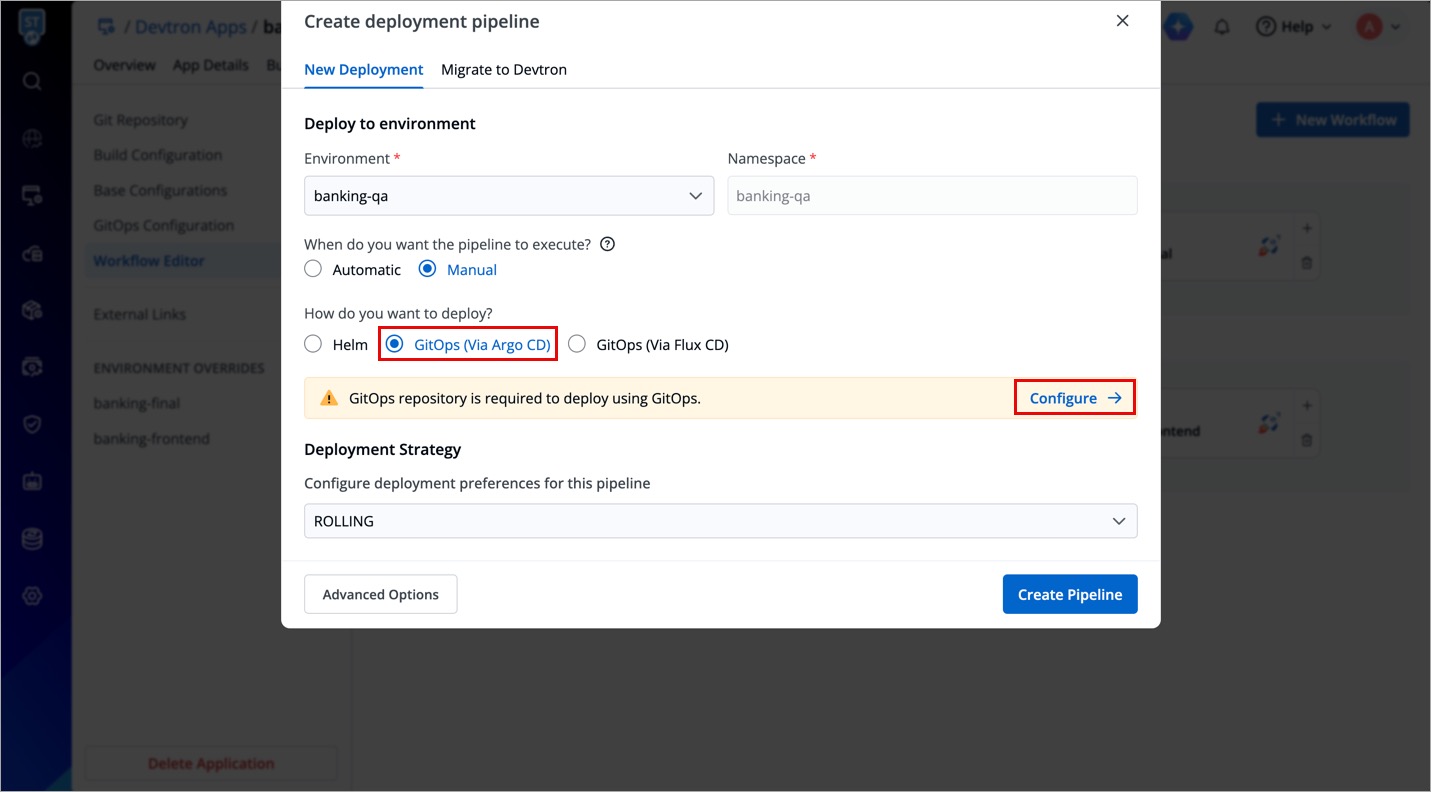
If either of the above prerequisites is not met, the "How do you want to deploy?" section will not be functional for GitOps. Even if the radio buttons are visible, selecting a GitOps option will show a warning and block pipeline creation until the repository is configured. In such cases, Helm is used as the default deployment method.
Feature Flags
Two feature flags control the visibility of the deployment approach selector:
| Flag | ConfigMap | Default | Effect |
|---|---|---|---|
IS_INTERNAL_USE | orchestrator-cm (Orchestrator) | — | When enabled, controls internal Devtron behaviour related to deployment method selection |
HIDE_GITOPS_OR_HELM_OPTION | dashboard-cm (Dashboard) | false | When set to true, hides the How do you want to deploy? radio buttons from the deployment pipeline dialog |
- Setting
HIDE_GITOPS_OR_HELM_OPTION: "false"(default) shows the Helm / GitOps radio buttons to users, letting them explicitly choose their preferred deployment approach. - Setting
HIDE_GITOPS_OR_HELM_OPTION: "true"hides the selector. In this case, Devtron falls back to Helm as the default deployment method for all pipelines.
How to Configure the Feature Flags
You can edit the relevant ConfigMaps in two ways:
Method 1: Via Devtron's Resource Browser
- Go to Resource Browser from the left navigation.
- Select the cluster where Devtron is running — typically
default_cluster. - In the left panel, expand the Config & Storage dropdown.
- Click ConfigMap.
- Use the namespace filter on the right to select the
devtroncdnamespace. This filters ConfigMaps to only those belonging to Devtron.
Editing dashboard-cm (for HIDE_GITOPS_OR_HELM_OPTION)
-
Find
dashboard-cm(it may have an optional suffix). -
Click Edit Live Manifest.
-
Under the
datasection, add or update the flag:data:
HIDE_GITOPS_OR_HELM_OPTION: "false" # "true" to hide the selector -
Click Apply Changes.
Editing orchestrator-cm (for IS_INTERNAL_USE)
-
Find
orchestrator-cm(it may have an optional suffix). -
Click Edit Live Manifest.
-
Under the
datasection, add or update the flag:data:
IS_INTERNAL_USE: "true" # set as needed -
Click Apply Changes.
Method 2: Via the Parent Deployment Pipeline (Helm Chart / GitOps App)
If Devtron itself is managed as a service through a deployment pipeline (e.g., via its own Helm chart or a GitOps-managed app), you can edit the ConfigMap values directly from that parent pipeline's configuration:
- Navigate to the parent application that manages the Devtron deployment.
- Go to App Configuration → ConfigMaps.
- Find
dashboard-cmororchestrator-cmas applicable. - Click the edit (pencil) icon.
- Add or update the relevant flag key-value pair.
- Save the changes and trigger a re-deployment if needed for the values to take effect.
Changes to ConfigMaps in a running pod may require a pod restart to take effect, depending on how the application reads its configuration. If the change does not reflect immediately, restart the relevant Devtron component (dashboard or orchestrator) from the Resource Browser.
Behaviour Reference
HIDE_GITOPS_OR_HELM_OPTION value | What the user sees | Deployment method used |
|---|---|---|
false (default) | Radio buttons for Helm, GitOps (Via Argo CD), and GitOps (Via Flux CD) are visible | Whichever method the user selects |
true | The How do you want to deploy? section is hidden | Helm (always the default fallback) |