LDAP
Sample Configuration

Values to fetch from LDAP
Devtron provides a sample configuration out of the box. Here are some values you need to fetch from your LDAP.
| Field | Explanation | Example |
|---|---|---|
host | LDAP server hostname with port | ad.example.com:636 |
bindDN | DN of the LDAP service account used by Devtron to query users and groups. This is not the user logging in. | cn=Administrator,cn=users,dc=example,dc=com |
bindPW | Password of the bindDN account | admin0! |
userSearch.baseDN | Directory path under which Devtron searches for LDAP users | cn=Users,dc=example,dc=com |
userSearch.username | LDAP attribute used as the login username | userPrincipalName |
If you see this error while saving the LDAP configuration, ensure that you have set the URL field above the configuration editor.
Click the Click to use link shown below the URL field to auto-populate the correct Devtron URL, or manually enter it before saving.
Reference
Auto-assign Permissions 
Since LDAP supports creation of User Groups, this feature simplifies the onboarding process of organizations having a large headcount of users. It also eliminates repetitive permission assignment by automatically mapping your LDAP User groups to Devtron's Permission Groups during single sign-on (SSO) login.
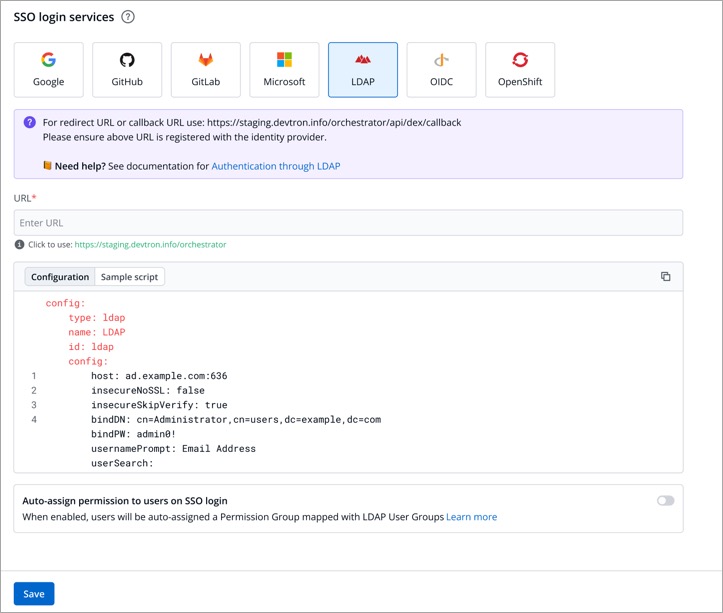
If you've created user groups in LDAP, you can create corresponding permission groups in Devtron with the same names. When members of those user groups first log in to Devtron, they'll automatically inherit the permissions from their Devtron permission group. This means you can't manually adjust or add individual permissions for users mapped to a permission group.
SSO login requires exact matching between Devtron permission group names and LDAP user groups. Any discrepancies or missing groups will prevent successful login.
Once you save the configuration with this auto-assign feature enabled, existing user permissions will be cleared and the future permissions will be managed through Permission Groups linked to LDAP user groups.
If you're missing some permissions that you know you should have, try logging out and signing back in to Devtron. This will refresh your permissions based on your latest LDAP user group.